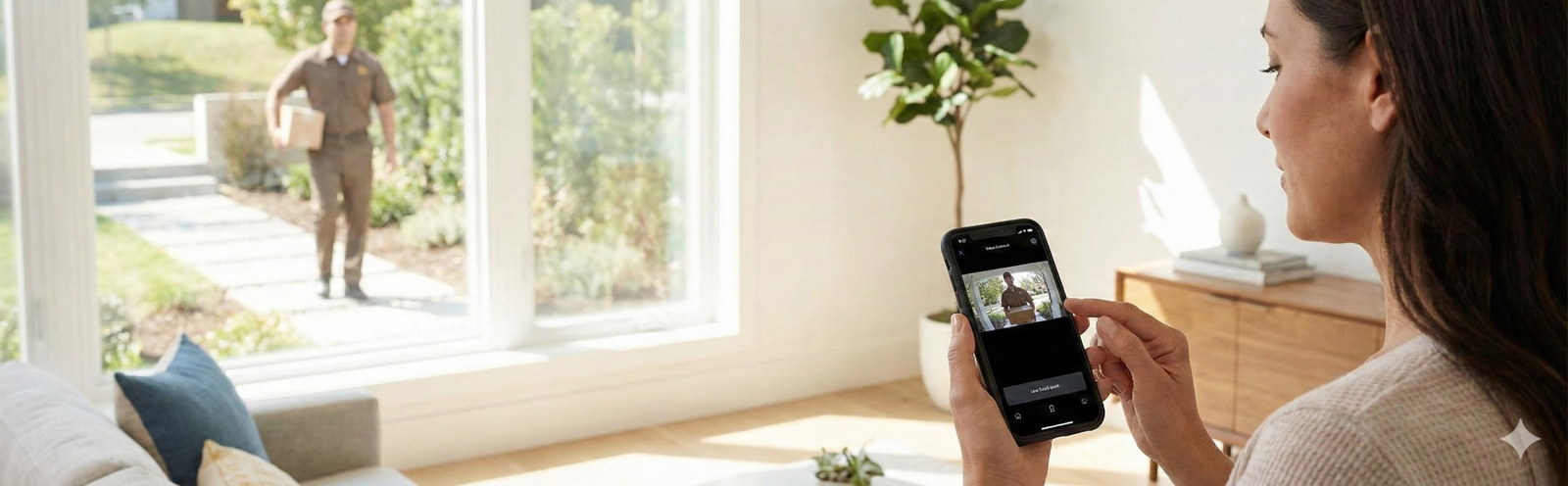
Most people do not buy a smart doorbell because they want a “smart home gadget.” They buy one because something small but annoying keeps happening at the front door: missed deliveries, porch-drop confusion, strangers showing up unexpectedly, or the feeling that the most exposed part of the house has the least visibility. A good smart doorbell solves those problems fast. A bad one creates new ones with weak Wi-Fi performance, endless false alerts, battery frustration, and subscription regret.
This guide is built for the real buying decision, not just a feature list. The right choice depends less on flashy marketing and more on four practical questions: do you have wiring, how much package visibility you need, whether you are okay with a monthly plan, and which smart home app you already trust. Once those are clear, the best option usually becomes obvious.
Quick answer / TL;DR: if you want the safest all-around choice for a wired home, Ring Wired Doorbell Pro is the cleanest performance-first pick. If you need easy installation, Ring Battery Doorbell Plus is the easiest recommendation for most households. If you want better package coverage without leaning on monthly fees, eufy’s dual-camera approach makes more sense. If reliability matters more than convenience and you can run a cable, Reolink PoE is the most control-friendly option in this lineup.
- Best wired performance: Ring Wired Doorbell Pro
- Best for Google Home users: Google Nest Doorbell (Wired, 2nd Gen)
- Best battery pick for most homes: Ring Battery Doorbell Plus
- Best no-fee-leaning package visibility: eufy Security Video Doorbell E340
- Best for local control and stability: REOLINK Video Doorbell PoE
- Best for Arlo households: Arlo Video Doorbell 2K (2nd Gen)
- Best budget-first option: Wyze Wireless Video Doorbell Pro
What actually makes a smart doorbell worth buying?
The short version: a smart doorbell is only “smart” if it reduces friction in daily life. That means alerts you can trust, a view that actually shows the doorstep, audio that is clear enough to use without embarrassment, and a storage setup that does not feel like a bait-and-switch after the first week. Plenty of models look competitive in screenshots. Fewer stay useful once the novelty wears off.
For most buyers, the winning doorbell is not the one with the most impressive headline spec. It is the one that fits the front door you already have. A battery model can be perfect when you do not want to touch wiring. A wired model is usually better when you hate maintenance. A PoE model is the strongest fit when you value reliability and local control more than quick setup. That is why feature comparison without context leads to buyer regret.
The 4-filter framework that makes the choice easier
- Power: wired, battery, or PoE changes almost everything about maintenance and reliability.
- View: package visibility matters more than bragging rights. Head-to-toe framing or a dual-camera setup is often better than chasing the biggest number on the box.
- Storage: decide early whether you are fine with cloud plans or whether you strongly prefer local recording.
- Ecosystem: Ring makes more sense in Alexa-heavy homes, Nest feels more natural in Google Home households, and some buyers simply want a less cloud-dependent setup.
If you want a deeper breakdown of the features that matter before you buy, the site’s companion guide on smart doorbell features explained is the best follow-up after this roundup. And if you are still unsure whether a front-door camera is enough protection on its own, the comparison on smart doorbells vs. security cameras helps clarify where each product category fits.
Why most smart doorbells disappoint in real life
Most negative experiences do not come from the camera itself. They come from mismatched expectations. Buyers assume “front-door security” means every model will record everything, catch every package, and work perfectly on whatever Wi-Fi reaches the porch. That is not how this category behaves in practice.
- Weak Wi-Fi ruins otherwise good hardware. A doorbell at the edge of the home network can feel laggy even when the app and camera are both fine.
- Bad placement creates blind spots. Some buyers discover too late that they can see a visitor’s chest but not the package at their feet.
- Subscriptions feel invisible until after setup. Live view may be enough for some people, but many buyers really wanted stored history, richer notifications, or longer clip access.
- Too much traffic drains batteries fast. A front door facing a busy sidewalk is a very different environment from a quiet suburban porch.
- People overbuy. The “best” model on paper can be the wrong choice if your real goal was simply to answer deliveries and avoid missed drop-offs.
That is also why this page is intentionally built around real-life scenarios. The category is crowded with products that sound similar. The useful difference is not “which one exists,” but “which one solves your version of the problem with the least friction.”
Quick comparison table
Top picks by real-life use case
This is the part most roundup articles get wrong. They treat every model like a direct substitute when they are really optimized for different frustrations. The fastest way to get to the right answer is to match the product to the problem you are actually trying to solve.
Best wired performance pick: Ring Wired Doorbell Pro
Ring’s wired “Pro” position makes sense for one kind of buyer above all: the person who wants the front door covered well, does not want to think about charging, and is comfortable leaning into the Ring/Alexa ecosystem. In real life, that combination matters more than an isolated spec sheet. Wired power means one less maintenance task, which is a big quality-of-life improvement for busy homes.
The biggest reason to choose this model is not just video quality. It is control. Buyers who live on busy streets or deal with a lot of sidewalk activity usually care about motion tuning more than anything else. That is where a stronger wired model becomes easier to live with over time. You are not just buying a camera; you are buying a front-door workflow that needs to stay useful after the second week, not just the first day.
This is also the safest recommendation for homeowners who already know they want a premium setup and do not want to “graduate” from a cheaper option later. If your house already supports a wired install, it is often better to buy once than to compromise on convenience now and resent the extra battery upkeep later. The people who are happiest here tend to be homeowners, Alexa-first households, and buyers who care about a cleaner long-term experience more than about saving installation effort.
Who should skip it: renters, buyers without existing wiring, and anyone who wants a simpler install with less setup friction. If you already know you do not want to deal with power requirements, do not talk yourself into a wired model just because it looks more “serious.”
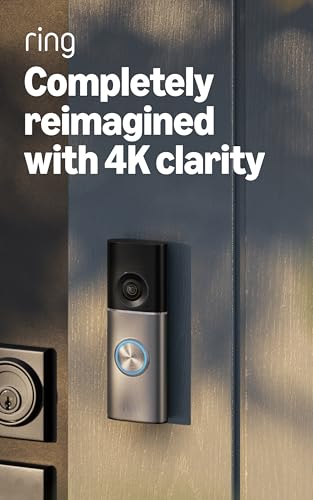
Ring Wired Doorbell Pro (newest model)
Best for buyers who already have doorbell wiring and want a premium front-door setup with less day-to-day maintenance.
- High-resolution wired video
- Enhanced zoom for distant details
- Live View and two-way talk
Best for Google Home households: Google Nest Doorbell (Wired, 2nd Gen)
Nest is not the best pick for everyone. It is the best pick for a specific household type: people already using Google Home who want their front-door camera to feel native instead of bolted on. That distinction matters. Smart-home products are judged less by how they look on a comparison chart and more by whether they fit naturally into the app routines you already use.
For buyers who already think in Google Home terms, Nest’s advantage is clarity. You want alerts that feel useful, fast access to what happened, and fewer “why is this in a different app?” moments. That kind of ecosystem fit is undervalued in generic buyer guides, but it matters a lot in real homes. The best smart doorbell is often the one the whole household can use without explanation.
Nest also makes sense for buyers who care about smart alerts more than they care about tinkering. If you want a polished, mainstream experience and your home already leans Google, Nest feels like the low-friction answer. It is especially appealing to people who manage family logistics, packages, and visitors through a phone-first routine rather than a more technical security setup.
Who should skip it: buyers who want to stay platform-neutral, or anyone specifically trying to reduce reliance on major cloud ecosystems. If your goal is maximum local control, this is not the most natural path.

Google Nest Doorbell (Wired, 2nd Gen – Pro Version)
Best for Google Home households that care more about smart alerts and app experience than about platform hopping.
- Smart alerts for people, packages, animals, and vehicles
- Setup and management in the Google Home app
- Event video history through the app
Best battery pick for most homes: Ring Battery Doorbell Plus
If you want the simplest recommendation for the broadest group of buyers, this is it. Ring Battery Doorbell Plus is the easiest answer when the front door does not already have ideal wiring, the household wants faster installation, and you still want a view that feels genuinely useful for deliveries. That “head-to-toe” framing is more important than buyers sometimes realize. A lot of frustration in this category comes from doorbells that show the visitor well enough but make package verification harder than it should be.
The practical appeal here is speed. You can get from unopened box to working front-door coverage much faster than with most wired alternatives. That matters for renters with permission, new homeowners who do not want to start with electrical work, and anyone who simply wants better visibility now. Not in three weekends. Not after calling an installer. Now.
The tradeoff, of course, is battery upkeep. That tradeoff is totally reasonable for many homes. It becomes less reasonable when your entrance sees constant motion or the doorbell is going to be triggered all day. Buyers often pretend they will not mind recharging until real life proves otherwise. So the honest answer is this: battery is best when convenience matters most, but only if your entrance is not unusually busy.
Who should skip it: households facing heavy daily foot traffic, homes where charging will quickly become a chore, or buyers who already know they strongly prefer a wired “install it once and forget it” setup.
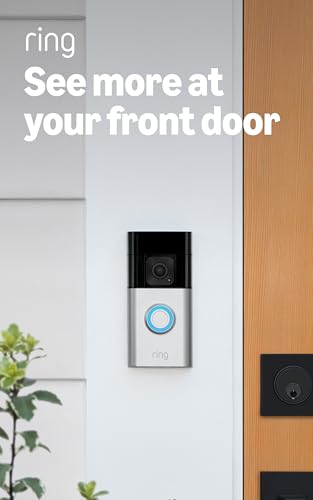
Ring Battery Doorbell Plus (newest model)
Best for buyers who need a straightforward battery model with a useful doorstep view and easier installation.
- Head-to-toe HD+ view
- Color night vision and motion zones
- Person and package alerts
Best for package-heavy homes without centering the decision on monthly fees: eufy Security Video Doorbell E340
eufy’s appeal is easy to understand because it is built around a very real problem: packages do not sit at eye level. That is why dual-camera positioning is more than a gimmick. For households that get frequent deliveries, the frustration is rarely “can I see a person?” It is “can I clearly confirm what happened at the doorstep?” The E340’s value proposition is strongest when that second question is what you care about most.
This is also one of the better paths for buyers who feel exhausted by the idea that every useful smart-home feature might turn into another monthly charge. That does not mean you should treat any device as magically fee-free in every setup, but it does mean eufy has a more natural appeal for people trying to keep ongoing costs under control. If the thought of local-storage-friendly setups immediately sounds more attractive than “pick a plan,” this model deserves a hard look.
In practical use, the E340 makes the most sense for porches with frequent packages, households where delivery confirmation matters, and buyers who care about seeing more of the doorstep rather than just seeing more of the visitor. It is a better fit for real package anxiety than a standard wide-angle doorbell trying to do everything with one view.
Who should skip it: buyers who want the simplest, most minimal setup possible or who dislike the idea of extra components or a more involved ecosystem path.

eufy Security Video Doorbell E340
Best for households that get frequent deliveries and want better package visibility without centering the decision on a monthly plan.
- Dual-camera package coverage
- Front-facing and downward views working together
- Color night vision
Best for reliability and local-control-minded buyers: REOLINK Video Doorbell PoE
Reolink PoE is the least “casual” recommendation on this page, and that is exactly why the right buyer loves it. This is not the easiest model for the average beginner, but it can be the most satisfying for the buyer who is done gambling on weak porch Wi-Fi and wants a setup that feels stable by design. If your main complaint with smart cameras is delay, lag, or flaky connectivity, PoE changes the conversation immediately.
What makes this model stand out is not just power and data over one cable. It is the mindset behind it. Reolink is the pick for homeowners who think in terms of reliability, local recording possibilities, and future expandability. If you can already picture yourself caring about network stability, NVR options, or a more serious security stack later, this path makes more sense than a lifestyle-first battery model.
In other words, Reolink is not the recommendation for “I want the easiest thing tonight.” It is the recommendation for “I want something I can trust and build around.” That makes it a strong fit for detached homes, technical buyers, and anyone whose porch location makes Wi-Fi less dependable than it should be.
Who should skip it: apartment renters, buyers who do not want to run Ethernet, and anyone looking for a quick, beginner-friendly install with the least possible friction.
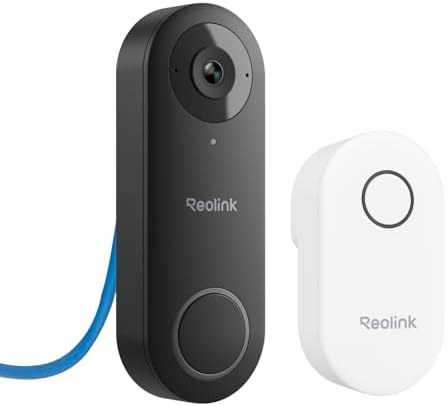
REOLINK Video Doorbell PoE Camera
Best for homeowners who care most about stable connectivity, wired reliability, and local-control-friendly setup paths.
- PoE setup for power and data
- 2K Super HD with 4:3 aspect ratio
- Plug-in chime included
Best for Arlo users who want a siren option: Arlo Video Doorbell 2K (2nd Gen)
Arlo is the easiest pick to understand if you start with the ecosystem question. If your household already uses Arlo and you like that app experience, adding an Arlo doorbell is often more sensible than forcing a different brand into the mix. The product itself is appealing because it combines broad front-door coverage with a more active deterrent angle thanks to the siren feature.
That does not automatically make it the strongest universal recommendation. It makes it the strongest recommendation for the buyer who already likes Arlo’s way of doing things and wants the front door to behave like the rest of the security setup. That matters more than many roundups admit. Mixed ecosystems sound flexible on paper but can feel clumsy in actual daily use.
Arlo’s best scenario is a household that already trusts the brand, wants a wide front-door view, and likes the idea of having a stronger “presence” at the door than just passive recording. That does not mean most buyers need a siren. It does mean some buyers feel better knowing the option is there.
Who should skip it: buyers who are not already leaning Arlo, or those who are simply looking for the most straightforward value play without brand-specific ecosystem reasons.
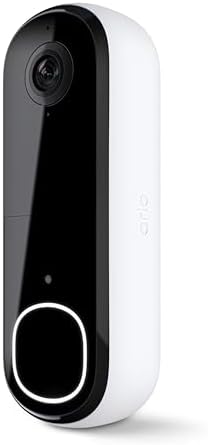
Arlo Video Doorbell 2K (2nd Gen)
Best for buyers already invested in Arlo who want a doorbell with a siren option and familiar app behavior.
- Wired or wireless depending on setup
- Live video and motion alerts in the Arlo app
- Privacy-forward positioning
Best budget-first option: Wyze Wireless Video Doorbell Pro
Wyze sits in the part of the market that gets a lot of clicks for a reason: buyers want useful coverage without premium-brand pricing. And to be fair, the core appeal is real. Easy installation, a broad front-door view, and a more approachable upfront cost are powerful advantages for first-time buyers who mostly want delivery visibility and basic remote answering.
Where the decision gets more complicated is trust. Budget products are not automatically bad, but low price does not erase privacy and account-security concerns. If you are the kind of buyer who lies awake worrying about security tradeoffs, the lower price may not feel like much of a win. If, on the other hand, you mainly want an affordable entry point and understand the tradeoffs, Wyze can still be a practical fit.
This is why it works best as a controlled recommendation. It makes sense for budget-minded households, starter apartments with permission, or first-time buyers testing whether they even use a doorbell camera enough to justify investing more later. It makes less sense as the obvious default for privacy-max buyers or for people who want the cleanest brand reputation possible.
Who should skip it: buyers whose top priority is privacy confidence, or anyone who would rather spend more upfront to avoid second-guessing the decision later.

Wyze Wireless Video Doorbell Pro
Best for budget-minded buyers who want wide, useful front-door coverage without paying premium-brand pricing upfront.
- Wire-free installation
- 1440 HD video with night vision
- Customizable chime included
How to choose the right smart doorbell without overthinking it
The easiest mistake in this category is turning a simple decision into a research spiral. Most buyers do not need a spreadsheet with twelve columns. They need an honest answer to five questions.
1) Do you want wired stability, battery convenience, or PoE reliability?
This is the biggest fork in the road. Wired is usually best when you already have compatible wiring and want less maintenance. Battery is best when installation ease matters most. PoE is best when you want a more stable, local-control-friendly setup and are willing to run Ethernet. Once you answer this one question honestly, at least half the market becomes irrelevant.
2) Is your real goal visitor awareness or package visibility?
These sound like the same thing, but they are not. If your biggest concern is porch theft, missed deliveries, or “where did the package actually land,” then the view matters differently. Head-to-toe framing helps. Dual-camera designs can help even more. Buyers who ignore this often end up with a device that technically works but still does not solve the actual problem that pushed them to shop in the first place.
3) Are you okay with cloud plans, or do you strongly prefer local storage options?
This is the “hidden” buying question because many shoppers only fully feel it after setup. Live alerts may be enough for some homes. Others want clip history, richer notifications, or a simpler path to local retention. If you already dislike recurring fees in principle, do not ignore that instinct now. It should shape the shortlist early.
4) Which smart home app will your household actually use?
A doorbell should fit how your household already functions. If you are building a broader setup, it is worth reading the site’s roundup of the best smart home devices for beginners, especially if the doorbell is only your first step. And if you live in a smaller space where device placement matters more than gadget count, the guide to a smart home setup for small homes is a useful companion. Smart doorbells are front-door tools first, but they work better when they fit the broader home system.
5) How good is the Wi-Fi at the actual door?
This question is boring, which is exactly why buyers skip it. Then they blame the doorbell for what is really a network problem. If your front door is at the edge of your signal, fix that before you buy or before you judge the product. A mesh node or better placement can make the difference between “great purchase” and “I hate this thing.”
Who should skip a smart doorbell entirely?
Not everyone should buy one right now. That is not a flaw in the category. It is just buyer honesty.
- Skip it for now if your front-door Wi-Fi is terrible and you are not willing to improve it. You will judge the product unfairly.
- Skip it if you actually need broader exterior coverage, not just a front-door angle. In that case, a camera setup may matter more than a doorbell, which is why the comparison between smart doorbells and security cameras matters before you buy.
- Skip it if you are deeply uncomfortable with any cloud-connected camera. A local-control-minded setup may still make sense, but a mainstream app-first doorbell probably will not feel good to you.
- Skip it if you live in a rental where installation is unclear and you have not checked what is allowed. The easiest install still needs to be a permitted install.
- Skip it if your goal is full-property surveillance. A doorbell is a front-door specialist, not a complete home perimeter plan.
The smartest buying move can be waiting until the setup around the product is ready. A great doorbell installed in the wrong environment is still a bad ownership experience.
Common mistakes that create buyer regret
Here are the errors that show up again and again, regardless of brand:
- Buying on brand name alone. Brand familiarity helps, but power style and placement matter more.
- Ignoring the package zone. If deliveries are your main reason for buying, do not settle for a camera angle that only kind of sees the doorstep.
- Underestimating battery maintenance. Battery models are convenient, but not “set and forget,” especially in busy areas.
- Leaving motion settings on default. This is one of the fastest ways to get alert fatigue and stop trusting the device.
- Thinking every model is cost-equivalent over time. Subscription comfort, local storage preference, and ecosystem lock-in change the real cost of ownership.
- Installing it too high or too far off-center. A good doorbell can still be made less useful by bad placement.
The deeper guide on what smart doorbell features actually matter is helpful here because it separates meaningful features from marketing filler. That alone can prevent a surprising amount of overspending.
A realistic maintenance routine that keeps the doorbell useful
Smart doorbells do not require much upkeep, but the little maintenance they do need matters a lot. The biggest ownership mistake is treating setup as a one-time event. A five-minute maintenance routine every so often protects the value of the purchase.
- Check motion zones after the first week. Your first settings are rarely your best settings.
- Review notification sensitivity after deliveries and high-traffic periods. Too many alerts make people ignore all alerts.
- Clean the lens occasionally. Front-door grime, weather, and fingerprints quietly reduce usefulness over time.
- Keep firmware and account protections updated. This matters especially for buyers using cloud-connected products.
- For battery models, create a charging habit before the battery is low. Reactive charging is how people end up unprotected during the exact week they needed the camera.
- Revisit package placement guidance. If you often talk to delivery drivers through the app, clear routines save time and reduce confusion.
The goal is not to babysit the device. It is to keep the product aligned with how your home actually functions. That is what separates “gadget clutter” from a tool you would immediately replace if it broke.
Scenario-based recommendations
If you are still torn between two options, these scenarios are usually a better tie-breaker than more spec hunting.
You live in a house with existing wiring and want the least maintenance
Start with Ring Wired Doorbell Pro. Nest is the alternative if your whole home already runs through Google Home, but the wired Ring route is the cleaner universal performance answer when app ecosystem is not the deciding factor.
You are a renter or you simply do not want to mess with wiring
Ring Battery Doorbell Plus is the easiest mainstream recommendation because it balances useful framing with fast installation. Wyze is the lower-cost alternative when price sensitivity is stronger than brand preference.
You get frequent deliveries and care most about what happens at the package zone
eufy E340 makes the most sense because its dual-camera logic matches the real problem. Wide-angle alone can help, but it is not the same as purpose-built package visibility.
You already use Google Home and want the front door to feel native
Choose Nest. The decision is not about whether other brands can work. It is about whether you want the front door to behave like the rest of the house with less friction.
You care more about reliability and local-control possibilities than about easy setup
Choose Reolink PoE. This is the path for buyers who want a sturdier foundation, not the fastest unboxing experience.
You already trust Arlo and want a more active deterrent option
Choose the Arlo Video Doorbell 2K. It is not the best fit for every buyer, but it is a logical fit for buyers who are already in that ecosystem and want a siren-capable front-door layer.
You want something affordable first, and you understand the tradeoffs
Wyze is the controlled budget recommendation. It makes sense if low upfront cost matters more than ecosystem prestige and if you are realistic about the trust tradeoffs.
FAQ
Do you need a subscription for a smart doorbell?
Not always. Many doorbells still give you live view and alerts without one. The real question is whether you want clip history, richer notifications, or a longer recording window. Buyers who hate recurring costs should weigh that early instead of treating it as an afterthought.
Is wired always better than battery?
No. Wired is better if you want less maintenance and already have the right setup. Battery is better if installation ease matters more. “Better” in this category usually means “more compatible with your home,” not “more expensive.”
What matters more: resolution or field of view?
For most buyers, the view matters more. A doorbell that sees the person and the package zone clearly is usually more useful than one with a stronger headline spec but weaker doorstep framing.
Are smart doorbells enough for full home security?
Usually not by themselves. They are excellent front-door tools, but they are not the same thing as a broader exterior camera plan. If you need more than entrance visibility, compare your options before assuming a doorbell alone is enough.
What is the biggest mistake first-time buyers make?
Buying the camera first and thinking about Wi-Fi, placement, and storage later. That is the fastest route to unnecessary frustration.
Which type is best for apartments?
Usually a battery model, assuming installation is allowed. Renters tend to value speed, flexibility, and easier removal later, which makes battery options more practical than wired or PoE routes in many apartment situations.
Final verdict
If you want the simplest recommendation with the fewest regrets, start by choosing your power style and your tolerance for ongoing fees. Do that honestly, and this category becomes much easier.
Best wired performance: Ring Wired Doorbell Pro.
Best Google Home fit: Google Nest Doorbell (Wired, 2nd Gen).
Best battery pick for most households: Ring Battery Doorbell Plus.
Best for package-heavy homes: eufy Security Video Doorbell E340.
Best reliability-first option: REOLINK Video Doorbell PoE.
Best for existing Arlo users: Arlo Video Doorbell 2K.
Best budget-first pick: Wyze Wireless Video Doorbell Pro.
The most important takeaway is this: the best smart doorbell for home security is not the one with the loudest spec list. It is the one that fits your entrance, your network, your package habits, and the app ecosystem your household will actually use. Buy for that reality and you are far more likely to end up with a front-door tool that remains useful long after the novelty wears off.
Amazon disclosure: As an Amazon Associate, Buyers Choice Lab may earn from qualifying purchases. That does not increase your price. The goal of this guide is to help you choose the model that fits your home, not to push the most expensive option.
Editorial note: This roundup prioritizes real-life fit: installation style, package visibility, ecosystem comfort, maintenance burden, and storage tradeoffs. That is where most buyer regret starts, and it is where the best purchase decisions get made.